DNS Over HTTPS (DoH): What, Why, and How It Works
You’re at a coffee shop. You join the free Wi-Fi, type bank.example.com, and start checking your balance. The connection to your bank is locked behind that reassuring little padlock — TLS, encrypted, private.
Except the question you asked first wasn’t private at all.
Before your browser could open that encrypted tunnel, it had to ask a simple question:
“What’s the IP address for bank.example.com?”
That question — a DNS lookup — left your laptop unencrypted, in a 40-year-old format (RFC 1035 ), for anyone on that Wi-Fi (and your ISP, and a few hops in between) to read, log, or quietly change.
The padlock protects what you say. For decades, nothing protected who you were talking to. That’s the problem DNS over HTTPS (DoH) tries to fix.
The problem: classic DNS is a postcard#
DNS is the internet’s phone book: it turns names humans remember (bank.example.com) into addresses machines route to (203.0.113.10).
It’s brilliant, essential — and it was designed in 1983, when the network was a trusting place.
By default, classic DNS travels as plaintext UDP on port 53. That creates three concrete problems:
- Eavesdropping. Every lookup is readable on the wire. Even with HTTPS everywhere, your DNS history can reveal the sites, apps, and services you touch - a surprisingly complete map of your behavior. Network operators and ISPs can log it, analyze it, and in some places even monetize it.
- Tampering. Classic DNS has no built-in confidentiality or integrity protection. Anyone who can interfere with the network path can change the answer. That is the mechanism behind ISP NXDOMAIN ad pages, captive portals, some forms of censorship, and DNS hijacking that tries to send users somewhere they did not intend to go.
- Easy blocking. DNS is a convenient chokepoint. Blocking, redirecting, or filtering traffic on port 53 is simple, which makes DNS a favorite control point for surveillance, policy enforcement, and censorship.
The uncomfortable summary: you can encrypt the contents of every connection and still leak the intent behind many of them through DNS.
What DoH is (and how you’d use it)#
DNS over HTTPS (DoH) does exactly what the name says: it wraps your DNS queries inside an ordinary HTTPS request to a DNS resolver. Standardized as RFC 8484 in 2018, it gives DNS the two things it always lacked:
- Confidentiality — queries are encrypted with TLS, so the coffee shop, the ISP, and the hops in between see only that you’re talking to some HTTPS server, not what you asked.
- Integrity — TLS prevents on-path answers from being silently rewritten.
In practice you already have it:
- Browsers: Firefox and Chrome can send DNS over HTTPS to a resolver of your choice (Cloudflare, Google, NextDNS, etc.).
- Operating systems: Windows 11, macOS, iOS, and Android all support encrypted DNS profiles.
- Apps & tooling: anything that can speak HTTPS can do DoH — which is why it’s great for resolving names reliably on hostile or filtered networks.
One honest caveat up front: DoH is dual-use. The same property that hides your lookups from a snooping network also hides them from a defensive one — so malware increasingly uses DoH for stealthy command-and-control, and enterprises lose the DNS visibility they rely on for threat detection. A privacy win for users is a monitoring headache for blue teams.
How to actually use DoH#
There are three practical ways to use DoH on a laptop.
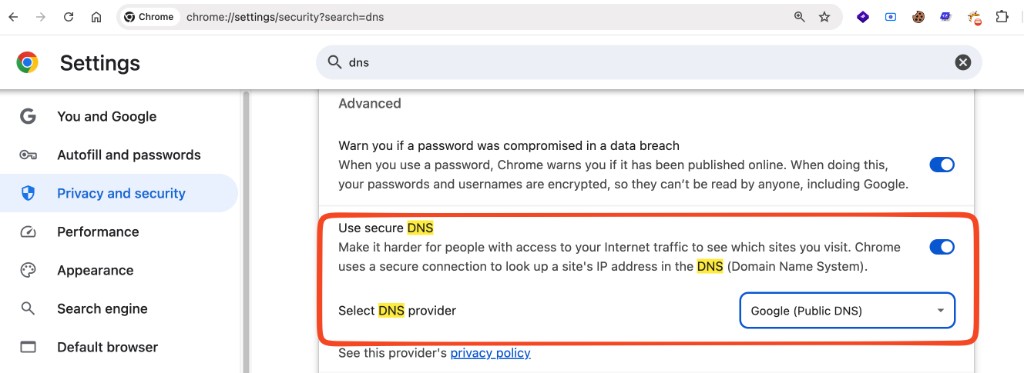
The easiest path is browser-level DoH. In Chrome, Edge, Brave, and Firefox, look for “Secure DNS” or “DNS over HTTPS” in privacy/security settings and choose a resolver such as Cloudflare, Google, Quad9, or NextDNS. This protects lookups made by that browser, but it does not automatically protect every app on the machine.
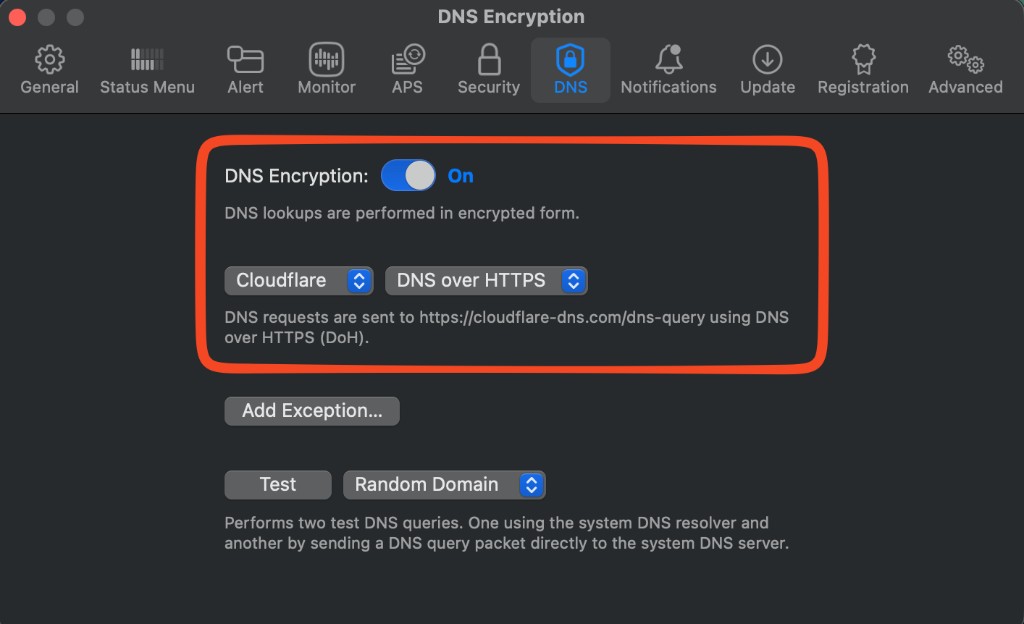
The better path is OS-level encrypted DNS. macOS, iOS, Windows 11, and Android can all enforce encrypted DNS at the system level, so apps using the OS resolver inherit it.
The most controlled path is local DNS forwarding. Run a local tool like cloudflared, dnscrypt-proxy, AdGuard, or NextDNS, point DNS at 127.0.0.1, and let the tool forward queries to DoH upstream.
For example, with Cloudflare’s cloudflared:
sudo cloudflared proxy-dns --address 127.0.0.1 --port 53 --upstream https://cloudflare-dns.com/dns-queryThen configure your machine or network interface to use 127.0.0.1 as its DNS server. Your apps still think they are using normal DNS, but the local forwarder sends the upstream query over HTTPS. Binding to port 53 usually requires admin privileges; if your forwarder listens on another local port, you need a local stub or system integration that can hand queries to that port.
How to enforce DoH on your own laptop#
Turning DoH on is one thing. Making sure nothing quietly falls back to plaintext DNS is the harder part.
On macOS, the default OS-wide approach is to use an encrypted DNS profile from the resolver you trust. This makes encrypted DNS part of the system network configuration instead of a browser-only preference. It is the closest thing to “set it once and let normal apps inherit it.”
If you want stronger enforcement, use a firewall such as Little Snitch:
- Allow outbound HTTPS to your chosen DoH resolver endpoints, for example
cloudflare-dns.com,dns.google,dns.quad9.net, or your NextDNS endpoint. - Block outbound classic DNS: UDP/53 and TCP/53.
- Optionally block DoT if you do not use it: TCP/853.
- Watch for apps that try to talk directly to known resolver IPs instead of using the system resolver.
This gives you a simple rule: DNS leaves the laptop only through the encrypted resolver path you chose. If an app tries plaintext DNS, it fails loudly instead of silently degrading privacy.
There is one important operational warning: captive portals, corporate networks, split-horizon DNS, and some VPNs may need exceptions. A coffee-shop Wi-Fi portal often expects your machine to use local DNS before you are allowed onto the internet. An office network may need internal names like jira.corp.example to resolve through corporate DNS. In those cases, you either need a temporary bypass, a network-specific exception, or a resolver that supports split DNS.
The technology: how DoH actually works#
Under the hood, DoH is less “new protocol” and more “old protocol in a better envelope.” DoH does not replace DNS. It wraps DNS in HTTPS.

The pieces that make it work:
1. A DoH endpoint.#
Resolvers expose an HTTPS URL, by convention https://resolver.example/dns-query.
A DoH endpoint is simply the URL where a DNS-over-HTTPS resolver accepts DNS questions. In classic DNS, your device sends a DNS packet to a resolver’s IP address on port 53, like:
8.8.8.8:53In DoH, your device sends the DNS query as an HTTPS request to a web URL, like:
https://resolver.example/dns-querySo instead of saying - “Send this DNS query to this DNS server over UDP.” - DoH says - “Send this DNS query to this HTTPS URL.”
The /dns-query path is a convention used by many DoH resolvers. For example, a resolver may expose:
https://cloudflare-dns.com/dns-query
https://dns.google/dns-query
https://dns.quad9.net/dns-query
The important thing is: the endpoint is not a normal website page meant for humans. It is an API endpoint. Your browser, OS, or DNS client sends a DNS query there, and the server returns a DNS response.
2. Port 443, not 53.#
Everything rides the same port as normal web traffic. That’s deliberate: DoH traffic is indistinguishable from any other HTTPS (I mean it can be, DoH can still be identified by known resolver IPs, SNI/hostname, certificate metadata, and traffic patterns. But it’s still better than plaintext DNS.), so it can’t be cheaply singled out and blocked (unlike its sibling, DoT — DNS over TLS — which uses a dedicated port 853 and is easier to spot and filter).
3. Two ways to carry the DNS query#
Once the client knows the DoH endpoint, it still needs to put the DNS question into the HTTPS request. There are two common ways you will see this.
Wireformat - RFC 8484 : the real DoH standard#
The client creates a normal DNS message, the same kind of binary DNS packet that would usually go over port 53. Then it places that DNS message inside an HTTPS request.
With POST, the DNS message goes in the request body:
POST /dns-query HTTP/2
Host: resolver.example
Content-Type: application/dns-message
Accept: application/dns-message

<binary DNS query>
With GET, the same binary DNS message is base64url-encoded and placed into the URL:
GET /dns-query?dns=<base64url-encoded-dns-query> HTTP/2
Host: resolver.example
Accept: application/dns-message
This is the proper DoH format. A compliant DoH resolver is expected to understand application/dns-message.
The important idea: DoH does not reinvent the DNS message. It takes the normal DNS packet and carries it inside HTTPS.
JSON: a convenience extension from Google/Cloudflare#
Some providers also expose a JSON API for convenience.
Instead of sending a binary DNS message, you send something easier to read:
GET /dns-query?name=example.com&type=A
Accept: application/dns-json
And the resolver returns a JSON response.
This is nice for debugging, demos, and quick scripts because you can call it with a browser or curl and read the result easily but it’s not universal (e.g. Quad9’s main endpoint speaks only wireformat).
4. TLS does the heavy lifting.#
The HTTPS handshake does the heavy lifting. It authenticates the DoH resolver, negotiates encryption keys, and creates a protected channel between your device and that resolver.
From that point on, the DNS query and response travel inside HTTPS. Observers on the local network, ISP path, or Wi-Fi hotspot cannot casually read or modify the DNS exchange.
But the protection is only for that first hop: client to resolver. Once the resolver receives the query, it still performs normal recursive DNS resolution on your behalf.
5. HTTP/2 (and HTTP/3) multiplexing.#
Because DoH uses real HTTP, many DNS queries can share the same encrypted connection and run in parallel. Instead of creating a fresh connection for every lookup, the client can reuse one already-open HTTPS connection.
That helps offset the TLS overhead and can make DoH fast in practice, especially after the first connection is established.
6. The resolver does the rest.#
On the far side, the DoH resolver behaves like a normal recursive resolver. It may answer from cache, or it may perform the usual DNS resolution process by walking the DNS hierarchy and querying authoritative nameservers.
The answer then comes back through the same encrypted HTTPS connection.
The wider DNS system does not change. DoH mainly protects the first hop: the path between your device and your resolver.
What DoH does not hide#
DoH encrypts the DNS question between your device and the resolver, but it does not make your browsing invisible.
A network observer may no longer see the exact DNS query, but they can still learn things from other metadata:
- The resolver you use. They can see that you are connecting to a DoH provider such as Cloudflare, Google, Quad9, or NextDNS.
- The destination IP. After DNS resolution, your device still connects to the website’s IP address.
- TLS metadata. In some cases, fields like SNI can still reveal the hostname unless Encrypted Client Hello is used.
- Traffic patterns. Timing, packet sizes, and connection behavior can still say a lot.
- The resolver still sees your queries. DoH shifts trust from the local network or ISP to the resolver you choose.
So DoH is not anonymity. It is not Tor. It does not hide everything.
What it does is narrower and still important: it prevents the local network and on-path observers from casually reading or modifying your DNS lookups.
Where DoH breaks, leaks, or gets bypassed#
DoH protects the DNS lookup path, but it does not force every network interaction to become private:
- Apps can bypass the system resolver. Browsers, VPN clients, EDR agents, malware, and developer tools may use their own resolver, fall back to classic DNS, use hardcoded IPs, or skip DNS entirely.
- Networks can block known DoH resolvers. Even on port 443, Cloudflare, Google, Quad9, or NextDNS can be blocked by IP, SNI, certificate metadata, or traffic patterns. Bypasses usually mean another resolver, a VPN, Tor, or a private DoH endpoint.
- Some networks need local DNS. Captive portals, home routers, printers, lab networks, and corporate split DNS may break if every query goes to a public DoH resolver. You may need split DNS, per-network rules, or temporary exceptions.
- Metadata still leaks outside DNS. Destination IPs, TLS SNI without Encrypted Client Hello, timing, and packet sizes can still reveal behavior.
- Managed devices can override it. MDM profiles, VPN clients, endpoint agents, root certificates, and network extensions can change or inspect DNS behavior.
DNS, DoT, and DoH at a glance#
| Feature | Classic DNS | DNS over TLS | DNS over HTTPS |
|---|---|---|---|
| Default port | 53 | 853 | 443 |
| Encrypted | No | Yes | Yes |
| Hides queries from local network | No | Yes | Yes |
| Easy to identify/block | Yes | Usually yes | Harder |
| Uses normal HTTPS stack | No | No | Yes |
| Common enterprise concern | Visibility loss is low | Some visibility loss | Higher visibility loss |
How to test DNS resolution and propagation#
First, test that your laptop is not leaking classic DNS. Run a packet capture, then resolve a domain in another terminal:
sudo tcpdump -n "port 53"
dig example.com
If DoH is enforced correctly and your local forwarder is not using plaintext upstream DNS, you should not see outbound DNS packets to external resolvers on port 53. If you do, something is still bypassing your DoH path.
You can also query a DoH resolver directly:
curl -H "accept: application/dns-json" "https://cloudflare-dns.com/dns-query?name=example.com&type=A"
curl -H "accept: application/dns-json" "https://dns.google/resolve?name=example.com&type=A"
If you want a small helper that checks multiple DoH providers at once, Anant Shrivastava has a handy doh_query.sh
script that wraps the same idea with curl and jq.
For propagation after changing a DNS record, remember that DNS does not propagate like a database replication event. Authoritative nameservers change first; recursive resolvers around the internet update as their cached records expire based on TTL.
Start by asking the authoritative nameserver:
dig +short NS example.com
dig @hera.ns.cloudflare.com www.example.com A
Use one of the nameservers returned by the first command. A healthy authoritative answer looks like this:
hera.ns.cloudflare.com.
elliott.ns.cloudflare.com.

;; ANSWER SECTION:
www.example.com. 300 IN A 104.20.23.154
www.example.com. 300 IN A 172.66.147.243
Then compare several public resolvers:
dig @1.1.1.1 www.example.com A
dig @8.8.8.8 www.example.com A
dig @9.9.9.9 www.example.com A
Each resolver should return the same answer set, though the order and TTL can differ:
;; ANSWER SECTION:
www.example.com. 235 IN A 104.20.23.154
www.example.com. 235 IN A 172.66.147.243
Finally, compare the same answer over DoH:
curl -H "accept: application/dns-json" "https://cloudflare-dns.com/dns-query?name=www.example.com&type=A"
curl -H "accept: application/dns-json" "https://dns.google/resolve?name=www.example.com&type=A"
The DoH response is JSON. Look for Status: 0 and matching values inside Answer:
{
  "Status": 0,
  "TC": false,
  "RD": true,
  "RA": true,
  "AD": false,
  "CD": false,
  "Question": [
    { "name": "www.example.com", "type": 1 }
  ],
  "Answer": [
    { "name": "www.example.com", "type": 1, "TTL": 222, "data": "172.66.147.243" },
    { "name": "www.example.com", "type": 1, "TTL": 222, "data": "104.20.23.154" }
  ]
}
Google may include trailing dots in name, a different AD value, a Comment, and different TTLs. That is fine. The important part is that the final data values converge across authoritative DNS, public resolvers, and DoH:
104.20.23.154
172.66.147.243
If the authoritative server has the new value but some recursive resolvers still return the old one, you are usually waiting on cache expiry. Check the TTL in the old response. That number is the resolver telling you how long it may keep serving the cached answer.
The takeaway#
DNS was one of the last big pieces of everyday browsing still traveling in the open. DoH closes that gap with no new infrastructure and no new ports - just the DNS we’ve always used, sealed inside the HTTPS we already trust.
It is not a privacy silver bullet. You are now trusting whichever resolver you choose. It can concentrate a lot of visibility in a few large providers. And it can make legitimate network defense, debugging, and policy enforcement harder.
But for the person on coffee shop Wi-Fi, the trade-off is simple and overdue: the question asked before every connection finally gets the same kind of protection as the connection itself.
The postcard, at last, has an envelope.